Save the date
Save the Date — an online wedding invitation with a live countdown and one-tap RSVP
To invite wedding guests online with Giftable, choose Save the Date, add your names, message, date and venue, then share the link: guests circle the day, watch a live countdown and answer. Sending one Giftable costs €3.
Live demo
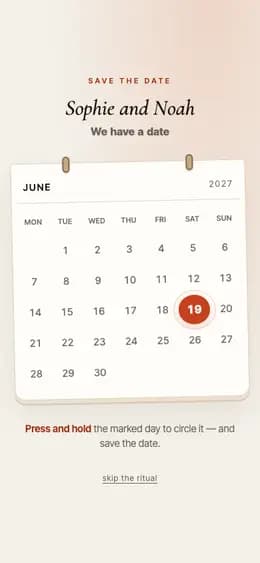
What the recipient sees
- 01Presses and holds the marked day in a calendar to circle it, or skips the ritual.
- 02The sheet opens: your names, the date in large type, a live countdown, your words.
- 03Taps an answer — I’m in, Let me think, Can’t make it — and it comes back to you.
What to prepare
- Your two names, and the guest’s name for the greeting line
- A few words: what the day is and what happens next
- The wedding date and time — the countdown counts down to it
- The venue, shown above an add-to-calendar link
- Optional: up to five questions of your own instead of the RSVP
What it fits
- Announcing the wedding date before the formal invitations go out
- Getting a yes or a no from guests before the seating plan
- An anniversary party or vow renewal people should hold the date for
- Telling guests the wedding has moved to a new date
Questions and answers
Do I need photos, and does anyone have to install an app?
No photos. This page is set in type: a calendar, the date, a countdown, your message and the venue, with no photo gallery, so it works for couples who have not shot anything yet. Nothing to install either — the giftable opens in the browser your guests already have, from the link you send them.
How do guests answer, and where do the answers go?
A guest taps I’m in, Let me think or Can’t make it, and their answer is sent back to you. You can replace that with up to five questions of your own — single choice, several choices, or free text up to 240 characters. Building and previewing is free; sending one Giftable costs €3, three cost €5 and ten cost €10.
Is this a full guest-list tool with seating and plus-ones?
No. Save the Date is one invitation page behind one link, so everyone you send it to opens the same page. It collects answers, not a guest list, seating chart, per-guest plus-one limits or automatic reminders. The countdown runs to the date and time you set; on the day itself the page says the wedding is today instead of counting.
When should I send it, and what if the wedding date changes?
The usual advice is four to six months before the wedding, and nearer six months for a destination wedding or a holiday weekend, so guests can book travel. If the date moves you edit the same giftable instead of sending a new one: the link you already shared keeps working, and whoever opens it then sees the new date with the countdown running to it.
True for every giftable
How to create and send it
- 01Pick this format from the catalog.
- 02Fill in the fields and check the preview — free, no account needed to start.
- 03Pay €3 for this giftable, or use a credit you already have.
- 04Share the link — it opens in any browser, no app for either of you.
Price
Building it and looking at the preview is free. You pay before you send.
- €3 — one giftable
- €5 — a pack of 3
- €10 — a pack of 10
One-time payments, no subscription. Prices in euro.
- 38 formats
- 6 languages
4.9/5 from early users