Neon marquee
Neon Marquee — an online party invitation your guest switches on, then RSVPs
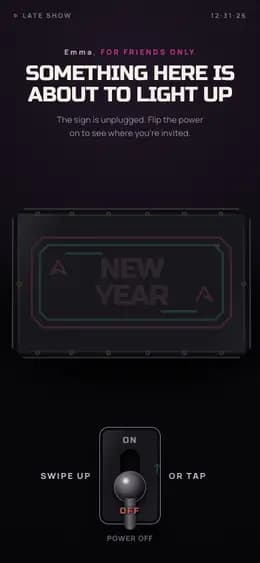
Giftable’s Neon Marquee is an online party invitation with RSVP: your guest flips a switch, the neon sign lights up with your message, date and place, and taps a reply that reaches you. Sending one Giftable costs €3.
Live demo
See it for:InvitationBirthdayHolidayNew jobQuinceañeraGraduationBaby showerEngagementNew homeFarewellFirst day of school
What the recipient sees
- 01Swipes up on the power switch — the dark neon sign flickers and hums awake.
- 02Reads the lit sign and the ticket: your message, when to come and where.
- 03Taps the RSVP — “Are you in?” — and the answer comes straight back to you.
What to prepare
- The guest’s name — the invitation opens on it
- Who is inviting: the name signed under the ticket
- A few words: what the night is, dress code, when to arrive
- The date and time, shown on the ticket and the masthead
- The bar, club or address, right under the date
- Optional: up to five questions of your own instead of the RSVP
What it fits
- A grown-up birthday party, not another card in the group chat
- New Year’s Eve with the people you actually want in the room
- A hen or stag night the whole group can answer in one tap
- The office party or team night nobody opens the email for
Questions and answers
Do I need photos, and does anyone have to install an app?
No photos — this template does not take any. The sign, the bulbs and the ticket are all drawn, so the invitation is ready the same evening you decide to throw the party. The words that light up follow the occasion you pick when you start: a birthday, a hen night, a stag night, New Year, a team night or simply a party. Nothing to install either — the giftable opens in the browser your guests already have, from the link you send by WhatsApp, Telegram or message.
How does the RSVP work, and where do the answers go?
Once the sign is lit the page asks “Are you in?” with count me in, let me check and can’t make it, and the answer comes back to you. Your guest needs no account and no sign-up to reply. You can replace it with up to five questions of your own: single choice, several choices, or free text up to 240 characters. Your guest can also send the same answer straight to you through WhatsApp or Telegram from the confirmation screen. Building and previewing is free; sending one Giftable costs €3, three cost €5 and ten cost €10.
Can I send it to the whole guest list and see who is coming?
It is one link, and everyone who opens it sees the same invitation — the same greeting name, the same ticket. There is no guest list, no per-guest link and no headcount that adds itself up as replies arrive; the answers reach you one by one. If you need to know who each answer belongs to, make “What’s your name?” one of your own questions, or send a separate giftable to the few people whose reply you really have to track.
True for every giftable
How to create and send it
- 01Pick this format from the catalog.
- 02Fill in the fields and check the preview — free, no account needed to start.
- 03Pay €3 for this giftable, or use a credit you already have.
- 04Share the link — it opens in any browser, no app for either of you.
Price
Building it and looking at the preview is free. You pay before you send.
- €3 — one giftable
- €5 — a pack of 3
- €10 — a pack of 10
One-time payments, no subscription. Prices in euro.
- 38 formats
- 6 languages
4.9/5 from early users