Wedding
Telling guests the wedding has moved to a new date
A change of date notice guests can answer: the page shows the new date with the countdown reset to it, and asks again whether they can come. Free to build and edit; €3 for the giftable you send.
No account needed to start

Write it your way
Write every line yourself, or let the AI writing helper draft one for you.
€3 once to send
Building and previewing are free. Sending costs €3 one-time - 3 for €5, 10 for €10 - and never renews.
One private link
They open it in any browser on any phone. Nothing to install, no account for them.
Live demo
The countdown reads from the date you set, so the day the guest sees is always the current one - not the date printed on something you posted in March.
- Live since 2025
- 38 formats
- 6 languages
4.9/5 from early users
Try it - scratch me ↓

Happy 30, Mira!
 Scratch me
Live mini demo
This is what they get
How to word a change of date
“Our wedding has moved to [new date]. Same two people, same place, one new square in your calendar. Please tell us again if you can be there.”
“This is the message we hoped not to write. For reasons outside our hands the wedding moves from [old date] to [new date]; everything else stays exactly as it was, including how much we want you there. If the new day does not work, say so honestly - we would rather know than wonder.”
“Change of date: the wedding will now take place on [new date] at [venue]. Travel and accommodation booked for the old date will need changing; please answer from the page so we can update the numbers.”
How it works
What they will see
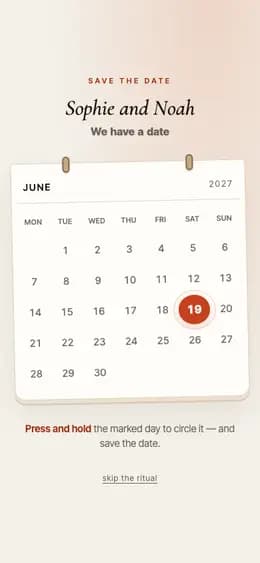
- Presses and holds the marked day in a calendar to circle it, or skips the ritual.
- The sheet opens: your names, the date in large type, a live countdown, your words.
- Taps an answer — I’m in, Let me think, Can’t make it — and it comes back to you.
Pick the format and fill it in
Names, your message, and the details this format uses - a date, a place, wishes or a few photos. No account needed to start.
Preview it as they will see it
The live preview runs the real page: opening ritual, reveal, and the closing question. Building and previewing is free.
Send the link
Sending one giftable costs €3 (3 for €5, 10 for €10). It opens in any browser with no app, and their answer comes back to your dashboard.
Frequently asked questions
Do we have to send a new link to everyone?
No. Edit the giftable you already sent and the link keeps working - anyone who opens it, including guests who saved it weeks ago, sees the new date with the countdown running to it. There is nothing more to pay: the €3 covered the giftable, not each version of it.
How do we find out who can still come on the new date?
The page asks again. A guest taps "I'm in", "Let me think" or "Can't make it", or answers up to five questions you write yourself, and every answer comes back to you on the giftable with an email for the first ones. Someone who already answered for the old date can answer a second time - the new reply arrives alongside the old one, so you can see who changed their mind.
What should the wording avoid?
Long explanations and apologies that ask guests to reassure you. Lead with the new date, keep the reason to one clause, confirm what has not changed - place, times, the people - and make the next action obvious. Anyone who booked flights needs the date in the first line, not the fourth.

Made to feel personal
More like opening a gift. Less like reading an e-card.
Your real memories
Photos and words from your relationship, arranged as a small story.
A moment of discovery
Scratch, tap, and swipe interactions slow the moment down in a good way.
Their answer comes back
Their answer to the closing question lands in your dashboard.
More cards people make
Ready when you are
Make the message feel like a moment.
Start with the photos already on your phone. You can edit every word before anything is sent.
Make the new-date notice - free to preview